




Imagine having the power to master real-world cybersecurity skills from the comfort of your own workspace. A dedicated cybersecurity lab gives you a safe, hands-on environment to experiment, learn, and grow—without risking your personal or work systems.
This guide is your trusted roadmap for building a future-ready cybersecurity lab in 2026. We will explore why having your own lab is essential, walk through each setup step, highlight must-have hardware and software, share advanced tips, and look at emerging trends. Let’s get you ready to level up your skills and stay ahead in the ever-changing world of cybersecurity.
Why Build a Cybersecurity Lab in 2026?
Imagine being able to break, fix, and defend real systems—all without risk. That’s the heart of a cybersecurity lab. In 2026, as digital threats grow more sophisticated, building your own lab isn’t just “nice to have,” it’s essential for anyone serious about cybersecurity. Let’s explore why investing in a personal cybersecurity lab is the smartest move you can make for your skills and career.
The Value of Hands-On Learning
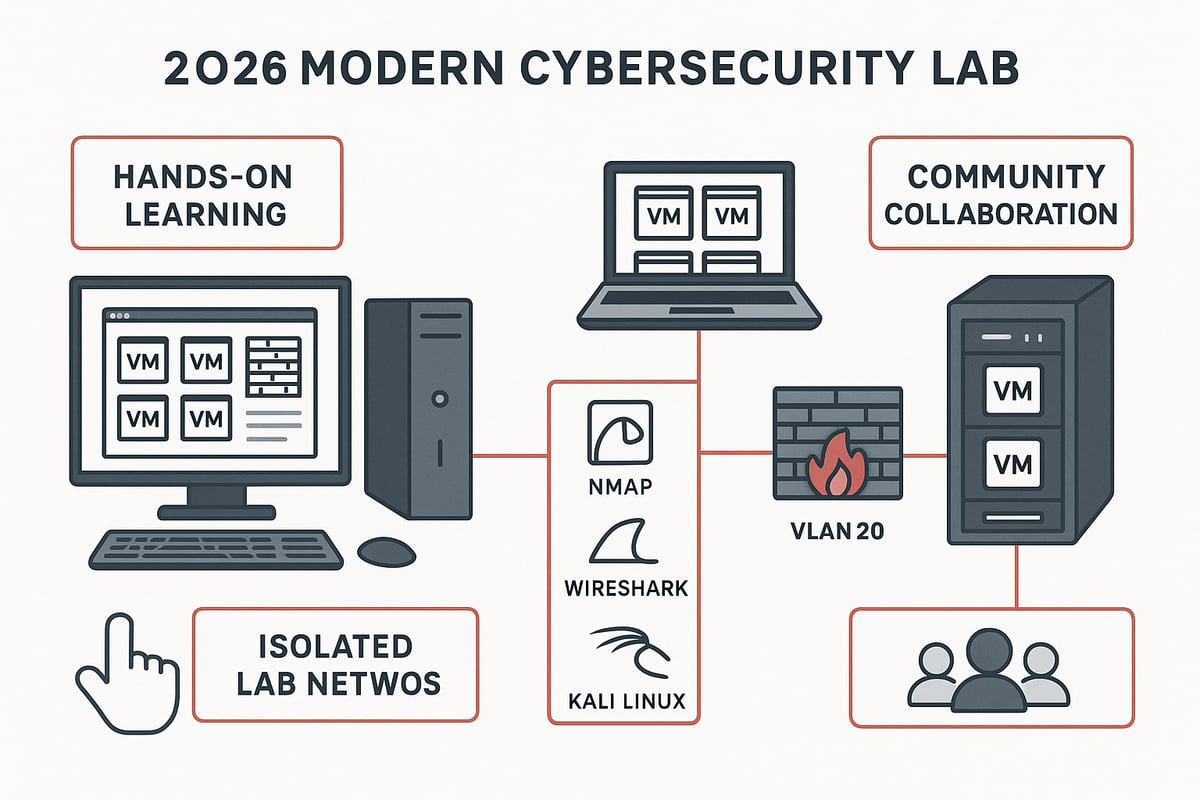
A cybersecurity lab bridges the gap between theory and real-world skills. Reading about vulnerabilities is one thing, but discovering and patching them in your own lab makes the knowledge stick. Labs let you troubleshoot, patch, and respond to incidents just like you would in a live environment. Real-world simulations, such as penetration testing and network defense, are only possible in a dedicated cybersecurity lab.
Studies show learners with hands-on cybersecurity lab experience report higher certification pass rates. In fact, over 70% of security professionals say that lab work is crucial for job readiness (Cybrary). For actionable guidance, the Designing Hands-On Cybersecurity Labs Guide offers practical steps to maximize your learning.
Safe Experimentation & Risk-Free Testing
A cybersecurity lab lets you test dangerous tools and exploits in a completely isolated environment. This means you can experiment without worrying about crashing your personal devices or production systems. Want to see what a ransomware attack looks like? In your lab, you can run it safely, take VM snapshots before testing, and roll back if things go wrong.
Snapshots and backups in your cybersecurity lab encourage learning without consequences. You can break things, learn from your mistakes, and restore your systems with a few clicks. This freedom to experiment is a major reason labs are so effective for skill-building.
Career and Certification Benefits
Setting up a cybersecurity lab gives you a powerful edge in the job market. Employers value candidates who can demonstrate practical skills learned in a lab. Preparing for certifications like CompTIA Security+, OSCP, or CISSP is much easier when you can practice in your own environment.
Many hiring managers say a home cybersecurity lab is a key differentiator during interviews. As threats and tools evolve, your lab becomes a playground for ongoing learning, helping you stay ahead and showcase your commitment to professional growth.
Lab Growth Mirrors Professional Development
Your cybersecurity lab should evolve alongside your skills. Start simple, perhaps with a single virtual machine, and scale up as you gain confidence. Over time, your lab can grow to mimic enterprise networks, complete with segmented networks, multiple domains, and advanced security tools.
Each upgrade in your cybersecurity lab represents a new level of competency. As you add complexity—like SIEM platforms or cloud integrations—you’ll be ready to tackle more advanced real-world challenges.
Community and Networking Opportunities
Building a cybersecurity lab isn’t a solo journey. Engaging with forums and online groups, such as Cybrary communities, helps you learn faster and troubleshoot tricky problems. Sharing your lab setup, swapping tips, and collaborating on exercises make the experience richer.
Connecting with others who run their own cybersecurity lab opens doors to mentorship, new resources, and even career opportunities. The community support can turn a technical challenge into a shared learning adventure.
Planning Your Cybersecurity Lab: Key Considerations
Embarking on your own cybersecurity lab journey is both exciting and empowering. With the right planning, you can create a space that grows alongside your skills, adapts to new technologies, and keeps your learning both safe and effective.
Defining Your Lab’s Purpose and Scope
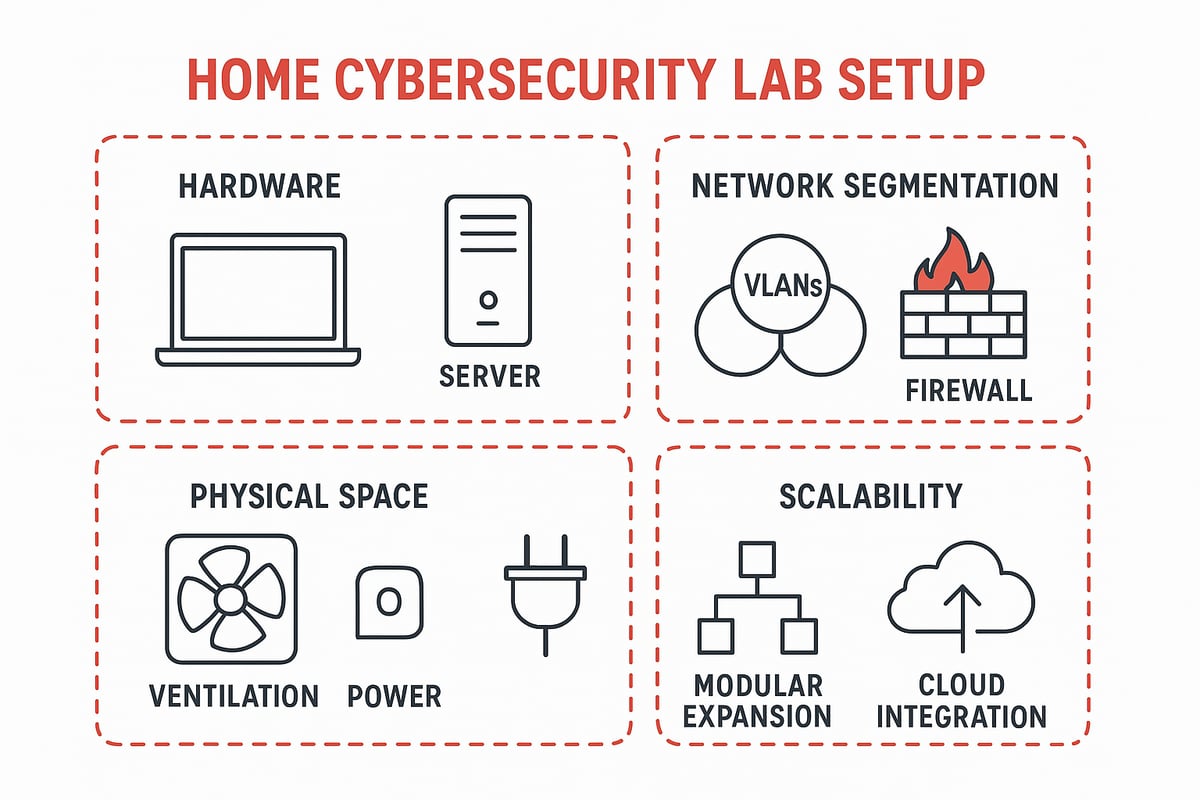
Start by asking yourself: What do you want from your cybersecurity lab? Are you aiming to master the basics, prepare for certifications, or simulate real-world attacks and defenses? Your goals will shape every decision, from hardware to software choices.
For beginners, a simple setup focused on Linux basics or Windows environments is perfect. Advanced users might design their cybersecurity lab to mirror complex corporate networks, complete with simulated attacks and layered defenses. Always align your ambitions with your current experience and make room for growth. Remember, your lab is a reflection of your learning path.
Budgeting for Hardware and Software
A great cybersecurity lab does not have to break the bank. Assess what you already have—an old laptop or desktop can become your first lab machine. As your needs grow, consider gradually upgrading to more robust hardware or adding components.
For those seeking a step-by-step approach to affordable setups, the Home Cybersecurity Lab Guide 2025 offers practical tips on maximizing value with minimal spend. Open-source tools and free software images can also stretch your budget further. Plan for both initial investments and future upgrades as your skills expand.
Space, Power, and Safety Requirements
Where will your cybersecurity lab live? Choose a spot with enough space for your gear and good ventilation to keep everything cool. Make sure your power supply can handle your equipment, especially if you add servers.
- Secure cables to prevent trips or accidental disconnects.
- Isolate your lab from the rest of your home network for safety.
- Keep liquids and clutter away from sensitive electronics.
Even a small, organized corner can become a productive cybersecurity lab if set up thoughtfully.
Security and Isolation Best Practices
The heart of a safe cybersecurity lab is isolation. Keep your lab network separate from your home or office to avoid accidental cross-contamination. Use VLANs, firewalls, or even a dedicated router to create strong boundaries between your lab and everything else.
Network segmentation not only protects your real data but also lets you experiment freely. Accidentally unleash malware? Your cybersecurity lab’s isolation ensures your main environment stays safe. Regularly review your setup to patch any weak spots, and always err on the side of caution.
Planning for Scalability and Upgrades
Think of your cybersecurity lab as a living project. Start with what you need now, but choose hardware and software that can evolve. Modular designs—where you can add new virtual machines, containers, or even cloud resources—make scaling up easy.
Maybe you begin with VirtualBox, then move to platforms like Proxmox or ESXi as your expertise grows. The ability to expand means your cybersecurity lab continues to challenge you, no matter how far your journey takes you. Plan upgrades in advance so your learning never hits a wall.
Step-by-Step Cybersecurity Lab Setup for 2026
Setting up your own cybersecurity lab is an exciting journey that unlocks hands-on skills and real-world experience. Whether you are just starting out or aiming to simulate enterprise-grade networks, we will walk through each step together. Let’s dive into building a future-ready environment that helps you grow and thrive in cybersecurity.
Step 1: Selecting and Preparing Hardware
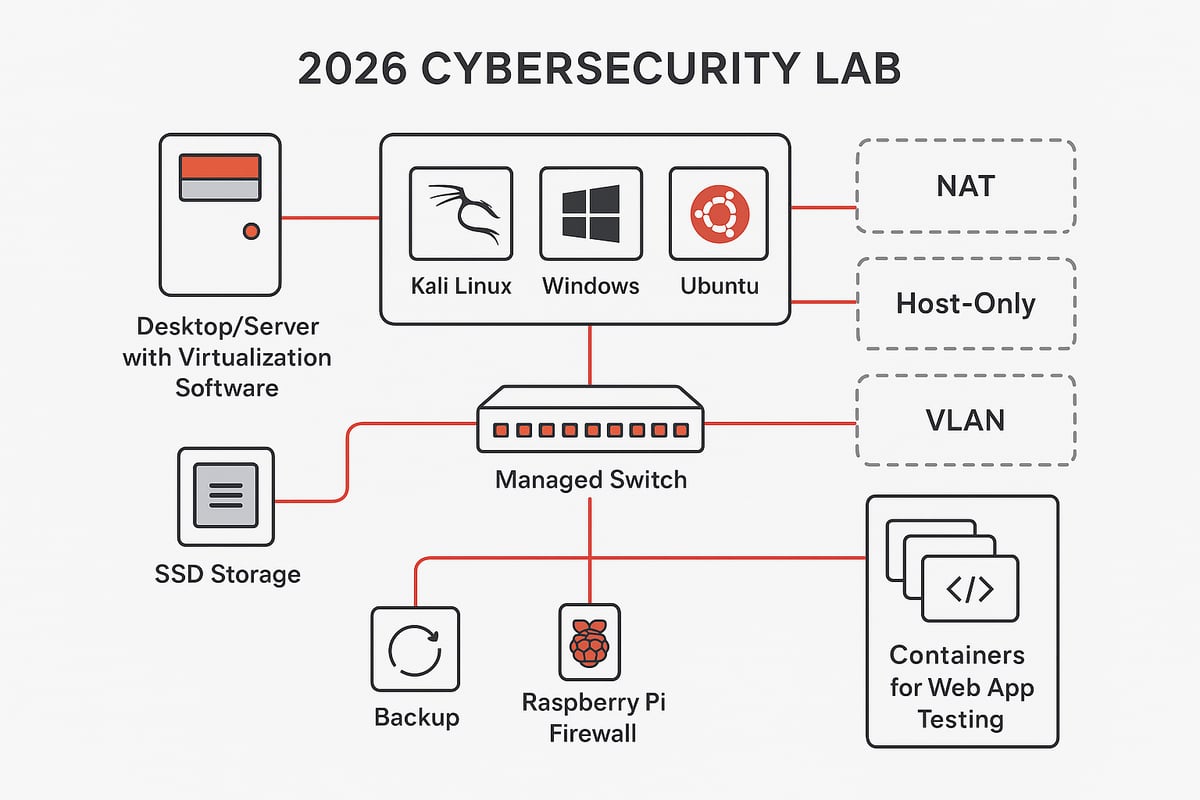
The foundation of your cybersecurity lab starts with the right hardware. Begin with what you have—many learners transform a basic laptop or desktop into a testbed. For smooth performance, aim for at least an Intel or AMD CPU, 16GB RAM, and an SSD for fast storage.
As your ambitions grow, consider upgrading to 32GB+ RAM, multi-core CPUs, or even a used server like a Dell PowerEdge. ARM-based devices like Apple Silicon Macs present compatibility challenges for some tools, but platforms such as UTM or Parallels can help. Raspberry Pi devices are fantastic for experimenting with network appliances or firewalls. No matter your budget, there is a hardware path to launch your cybersecurity lab journey.
Step 2: Choosing the Right Virtualization Platform
A virtualization platform is the heart of every cybersecurity lab. Options like VirtualBox and VMware Workstation are user-friendly and free for personal use, making them favorites among beginners. For those scaling up, Proxmox or VMware ESXi offer more advanced management and performance.
If you are working with ARM-based systems, UTM or Parallels Desktop are strong alternatives. Modular and scalable setups are key for long-term success—exploring frameworks like the Modular Cybersecurity Lab Design Framework can help you plan for growth and flexibility. Choose the platform that matches your hardware and future goals, ensuring your cybersecurity lab can evolve with you.
Step 3: Installing Operating Systems and Core Tools
Now, let’s bring your virtual environment to life. Download official ISO images for essential operating systems: Kali Linux for penetration testing, Ubuntu for general use, Windows 10 or 11 for Windows security practice, and Metasploitable for vulnerability testing.
Always verify checksums to ensure your downloads are safe. Install core tools like Nmap, Wireshark, Burp Suite, and Metasploit to cover scanning, analysis, and exploitation tasks. Many cybersecurity lab users create a dedicated vulnerable VM for safe exploit practice, letting you experiment freely and sharpen your skills.
Step 4: Network Configuration and Segmentation
Isolating your lab network is critical for security and peace of mind. Use NAT, bridged, or host-only adapters to separate lab traffic from your home or office network. For advanced setups, managed switches and VLANs provide granular segmentation.
Firewalls like pfSense or Pi-hole can be deployed on dedicated hardware (such as a Raspberry Pi) to filter traffic and simulate real-world defenses. This approach allows you to simulate internal attacks or malware outbreaks without exposing your actual devices. Proper segmentation ensures your cybersecurity lab remains a safe environment for every test.
Step 5: Adding Specialized Security Tools and Services
With your lab network in place, it’s time to install specialized tools that mirror professional environments. Security Information and Event Management (SIEM) solutions like Security Onion, Splunk Free, or the ELK Stack offer log analysis and monitoring.
For malware analysis, Flare VM and REMnux provide a toolkit for reverse engineering. Containers (using Docker or Podman) are perfect for spinning up vulnerable web apps like DVWA or Juice Shop. By layering these tools, your cybersecurity lab becomes an all-in-one playground for both offense and defense.
Step 6: Implementing Snapshots, Backups, and Recovery
Mistakes are part of the learning process, but with the right safeguards, they never have to be permanent. Take VM snapshots before testing exploits or malware to create restore points.
Establish a routine for backing up VM images and configuration files to an external SSD or cloud storage. Practice recovering from corrupted or compromised environments—this builds confidence and resilience. With a robust backup and recovery plan, your cybersecurity lab stays ready for any challenge.
Step 7: Documentation and Change Management
Keeping track of your lab’s evolution is essential for troubleshooting and sharing knowledge. Document your architecture, network settings, tool versions, and changes using wikis, spreadsheets, or version control systems like Git.
Clear records make it easier to recreate scenarios, debug issues, and showcase your work to peers or employers. Effective documentation transforms your cybersecurity lab from a personal project into a professional asset that grows with your skills.
Essential Hardware and Software for a Future-Proof Lab
Building a future-proof cybersecurity lab starts with selecting the right mix of hardware and software. The right setup ensures you can experiment, learn, and grow as new threats and technologies emerge. Let’s break down what you’ll need to create a lab that will serve you well into 2026 and beyond.
Core Hardware Components
The foundation of any robust cybersecurity lab is reliable hardware. For most learners, a laptop or desktop with an Intel i5/i7 or Ryzen 5/7, 16-32GB of RAM, and a fast SSD or NVMe drive is a great starting point. If you want to simulate larger environments, consider used enterprise servers like Dell PowerEdge or HP ProLiant. These offer more CPU cores and expansion for RAM, letting your cybersecurity lab scale as your skills grow.
Don’t forget networking gear. A managed switch, a quality router, and a USB Wi-Fi adapter like the ALFA AWUS036NHA give you flexibility for network segmentation and wireless testing. For storage, external SSDs (500GB–2TB) keep your VM images and backups safe and portable.
Whether you start with a budget-friendly laptop or invest in enterprise hardware, your cybersecurity lab should be able to grow with you.
Recommended Software Stack
The software powering your cybersecurity lab is just as important as the hardware. Virtualization platforms like VirtualBox, VMware Workstation, Proxmox, or Hyper-V allow you to run multiple operating systems and test scenarios safely. Choose the one that fits your experience and hardware best.
Essential operating systems include Kali Linux for penetration testing, Ubuntu for general Linux practice, Windows 10/11 for defensive exercises, and Metasploitable for safe vulnerability exploitation. Security tools like Nmap, Wireshark, Hashcat, CyberChef, Burp Suite, and Metasploit form the backbone of any cybersecurity lab toolkit.
Combining open-source and free tools ensures you maximize your learning without breaking the bank. As your needs evolve, you can add more advanced software to your cybersecurity lab.
Advanced Tools and Platforms
A future-proof cybersecurity lab should expose you to enterprise-grade tools. SIEM platforms like Security Onion, Splunk Free, or the ELK Stack let you analyze logs and detect threats, much like in real organizations. For malware analysis, Flare VM and REMnux provide specialized environments for reverse engineering.
Cloud integration is now essential. AWS, Azure, and GCP free tiers let you practice cloud security and hybrid lab setups. Containerization with Docker or Podman gives you lightweight, scalable environments to run vulnerable web apps, like DVWA or Juice Shop, safely.
By embracing these platforms, your cybersecurity lab becomes a launchpad for advanced skills.
Accessories and Optional Upgrades
A well-equipped cybersecurity lab includes more than just computers and software. Packet injection Wi-Fi adapters and HackRF One unlock wireless and software-defined radio testing. Dedicated firewall devices, such as pfSense boxes or Raspberry Pis running DNS filtering, boost your security and network isolation.
A UPS (uninterruptible power supply) protects your lab from power outages and data loss. Multiple monitors and KVM switches help you manage several systems at once, increasing productivity and organization in your cybersecurity lab.
Upgrading accessories as your interests mature keeps your lab relevant and enjoyable.
LarsBirkeland.com: Strategic Cybersecurity Guidance
For those ready to take their cybersecurity lab skills to the next level, LarsBirkeland.com is a treasure trove. The site offers in-depth guides, real-world stories, and frameworks that bridge hands-on lab experience with strategic security leadership.

You’ll find templates and playbooks for building resilient programs, plus advice on risk communication and influencing decision-makers. If you want your cybersecurity lab work to translate into business value and leadership opportunities, this resource is especially valuable.
By tapping into these insights, you can move from technical proficiency to becoming a true security leader.
Best Practices for Maintaining and Using Your Lab
Establishing a cybersecurity lab is only the beginning—maintaining it with best practices ensures your learning environment remains effective, safe, and future-proof. Let’s break down the core habits that keep your lab running smoothly and help you get the most from every session.
Regular Updates and Patch Management
Keeping your cybersecurity lab current is essential for realistic simulations and security. Always update both host and guest operating systems, as unpatched software can introduce vulnerabilities that do not reflect actual threat scenarios. Automate updates whenever possible to save time and reduce risk.
Set a regular patch cycle for all your lab machines. For example, update Windows and Linux virtual machines weekly to match enterprise environments. Don’t forget about your security tools and network appliances—these need updates too.
By maintaining up-to-date systems, your cybersecurity lab accurately reflects real-world environments, helping you build habits that translate directly to professional settings.
Safe Testing and Ethical Boundaries
A cybersecurity lab is a playground for experimentation, but safety and ethics must come first. Never run malware or exploits on production or personal networks. Always keep your lab isolated from other devices using VLANs, firewalls, or dedicated routers.
Follow legal and ethical guidelines for offensive security work. Only test tools and techniques in environments you control and have explicit permission to use. For more insights on managing and securing your lab networks, the Network Security Management Tips resource offers practical advice.
This approach ensures your learning stays safe and responsible, letting you explore advanced tactics without unintended consequences.
Documentation, Change Tracking, and Version Control
Keeping thorough records is a cornerstone of a well-run cybersecurity lab. Document your configurations, network topologies, tool versions, and test results. Use wikis, spreadsheets, or version control systems like Git for tracking changes over time.
Clear documentation makes troubleshooting easier and enables you to reproduce successful attack or defense scenarios. If you want a deeper understanding of core security concepts to support your notes, the Cybersecurity Explained Guide is a great companion.
Structured recordkeeping also helps you share knowledge with peers and keeps your learning journey organized.
Backup, Recovery, and Disaster Planning
Protect your cybersecurity lab by implementing a solid backup and recovery plan. Regularly back up VM images, snapshots, and configuration files to external drives or cloud storage. Test your recovery procedures by restoring from backups—this ensures you can quickly recover from failures or experiments gone wrong.
Anticipate hardware failures or data loss by planning for redundancy. A strong disaster plan means your learning never comes to a halt, even if a simulated ransomware attack corrupts a VM.
Making backup and recovery a habit keeps your cybersecurity lab resilient and reduces downtime.
Community Engagement and Continuous Learning
No cybersecurity lab exists in a vacuum. Join online forums, participate in Capture the Flag (CTF) competitions, and share your lab setups with others. The community is a powerful resource for troubleshooting, discovering new tools, and staying current with evolving threats.
Engage with groups like Cybrary forums to connect with fellow learners. By contributing and learning together, you’ll keep your cybersecurity lab experience dynamic and always growing.
Advanced Lab Configurations and Future Trends
Ready to take your cybersecurity lab to the next level? Let’s explore how advanced setups and emerging trends can help us simulate real-world environments, connect to the cloud, automate deployments, and prepare for tomorrow’s threats. By building out your lab with these features, you’ll be ready for any challenge the future holds.
Simulating Enterprise Environments
A modern cybersecurity lab can mirror the complexity of a real business network. By setting up Active Directory domains, SIEM stacks, and segmented networks, you can practice skills that translate directly to the workplace. Multi-tiered networks are perfect for red, blue, and purple teaming scenarios.
Want to go deeper? Try building a small business replica, complete with users, servers, and policies. This hands-on approach not only builds technical skills but also gives you an edge in penetration testing roles. For more ideas on practical skills and career paths, check out How to Become a Penetration Tester. Each step you take in your cybersecurity lab prepares you for real-world incident response and defense.
Integrating Cloud and Hybrid Lab Components
The future of the cybersecurity lab is hybrid. By using free tiers from AWS, Azure, or GCP, you can practice cloud security testing without breaking the bank. Connecting your on-premises lab to the cloud lets you test real-world scenarios, such as IAM misconfigurations or serverless attacks.
Curious about which setup works best? The Cybersecurity Education Lab Comparison Study offers insights into the differences between on-premises and cloud-based labs. Mixing cloud and local resources in your cybersecurity lab ensures you’re ready to tackle both traditional and modern threats.
Automation and Orchestration in Lab Management
Automation is transforming how we manage cybersecurity labs. Tools like Ansible and Terraform can script the setup and teardown of complex environments. This means you can quickly spin up a pentest lab, reset it after a test, or scale up for group exercises.
With automation, your cybersecurity lab becomes more reproducible and less prone to human error. You’ll save time and reduce mistakes, all while learning valuable DevOps skills alongside security fundamentals. Embracing these tools prepares your lab—and you—for rapid changes in technology.
Preparing for Future Threats and Technologies
The cybersecurity lab of 2026 must adapt to new frontiers. AI-driven attacks, IoT vulnerabilities, and 5G networks are just a few areas where hands-on practice is essential. Make space in your lab for experimenting with AI-based detection tools and simulating attacks on smart devices.
Keeping your cybersecurity lab up to date means you’re always learning. Stay on top of new frameworks, compliance needs, and industry best practices. The more you future-proof your lab, the more confident you’ll be facing any cyber threat.
You’ve just seen how building your own cybersecurity lab can open doors to hands-on learning, meaningful certifications, and a stronger voice in your organization. It’s not just about tech—it’s about growing your skills and your confidence, step by step, with a supportive community by your side.
If you’re excited to keep learning, share your journey, and connect with others working toward the same goals, I’d love for you to join us at the Join Cyber Launchpad Community. Together, we can help each other stay ahead, grow as leaders, and make cybersecurity a little less overwhelming for everyone.